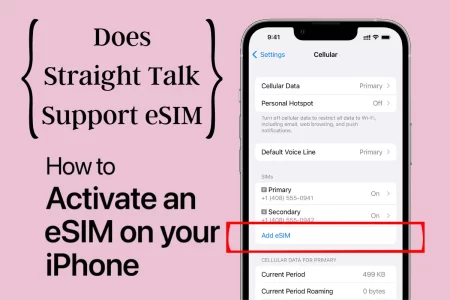
With eSIM, you can activate and switch between mobile networks without swapping out physical SIM cards. If you’re wondering whether Straight Talk uses eSIM, the answer is “Yes” but there are things you should know about using eSIM with Straight Talk, how to activate and enable the service.
Does Straight Talk support eSIM?
Yes, Straight Talk currently offers eSIM support. You can use eSIM to activate a new line of service or add a new line to an existing account. The eSIM service is available for both iPhones and Android phones, allowing you to bring your own eligible device and activate an eSIM with Straight Talk.
How to Use eSIM with Straight Talk?
When you purchase an electronic SIM from Straight Talk, you should receive an eSIM activation card with a QR code. Follow these steps to activate and switch to eSIM on Straight Talk:
- Ensure Straight Talk eSIM compatibility
- Download a valid eSIM QR code from Straight Talk or get a card.
- Ensure that you have a compatible iPhone model or newer Android model.
- You also need a wireless internet connection (Wi-Fi) for activation.
Steps to Activate eSIM on Straight Talk iPhone
- Open the Camera app on your iPhone and scan the eSIM QR code.
- Check your lock screen for a notification. If you don’t see it, swipe up from the middle of the screen to go to your Notification Center.
- Tap the notification that says “Straight Talk Cellular Plan Ready to be installed” and then select “Open” to start setting up your eSIM. If you can’t find the notification in the Notification Center, find and tap the “Settings” icon, then tap the message at the top of the screen.
- Tap “Continue” and find the label for your new TFW plan, then tap “Secondary.”
- Customize your new eSIM line by tapping the field under “CUSTOM LABEL” and enter the label you want. Tap “Done” to go back to the previous screen, then tap “Continue.”
- During the setup process, you may see a pop-up message saying your iPhone has been activated. Tap “Dismiss.”
- Tap the line you want to use as the default line, then tap “Continue.” If you customized the default line label, find and tap your customized label.
- Tap the cellular plan(s) you want to enable iMessage and FaceTime features for. A check mark will appear next to your selection(s). Tap “Continue.”
- Tap the default line you want to use for “Cellular Data.” A check mark will appear next to your selection. Tap “Continue” or “Done.”
- To make sure your phone has been successfully activated, open “Settings,” then go to “Cellular.”
- You will see the label for your new line next to the “Cellular Data” field. Below “CELLULAR PLANS,” you’ll find the phone number for your new plan(s).
- To make a test call during the setup process, tap the “Phone” icon, then select your new eSIM line before making the call.
Activate eSIM on Straight Talk Android
- Ensure that your Android device supports eSIM functionality and is compatible with Straight Talk.
- Obtain an eSIM activation code or QR code from Straight Talk. This code is typically provided when purchasing an eSIM plan or through Straight Talk’s customer support.
- Open the Settings app on your Android device.
- Look for the option related to eSIM or SIM card settings. It may be labeled as “SIM cards & mobile networks” or something similar.
- Tap on the eSIM or SIM card settings option.
- Select the option to “Add eSIM” or “Add SIM card.”
- Choose the option to scan the eSIM QR code or manually enter the eSIM activation code provided by Straight Talk.
- Follow the on-screen prompts to complete the eSIM activation process.
- Once the eSIM activation is successful, your Android device will be ready to use with the Straight Talk eSIM plan.
Why switch to eSIM with Straight Talk?
Using Straight Talk eSIM provides more flexibility and convenience as you can switch between carriers and plans without physically swapping SIM cards. Additionally, Straight Talk’s network is prepaid, cost-effective, and offers nationwide coverage.
Can I activate a new line on Straight Talk using eSIM?
Yes, Straight Talk allows you to activate a new line of service using eSIM on eligible devices.
Can I switch my existing Straight Talk line to eSIM?
Yes, you can switch an existing Straight Talk line to eSIM on compatible devices. Contact Straight Talk customer support or visit their website for specific instructions on how to make the switch.
Can I Use Any eSIM from Any Carrier on My iPhone?
If your iPhone is unlocked, you can use eSIM plans offered by other carriers.
Can I use eSIM from other carriers with Straight Talk?
No, you cannot use eSIM from other carriers with Straight Talk. Straight Talk supports its own eSIM service, and you need to activate an eSIM specifically with Straight Talk to use their service.

